
Multiple monitors can dramatically improve your trading workflow—or they can create information overload and distraction. The key is intentional setup that enhances rather than hinders your decision-making.
How Many Monitors?
Single Monitor: Perfectly adequate for most traders. Use tabs or multiple workspaces. Forces you to prioritize what matters.
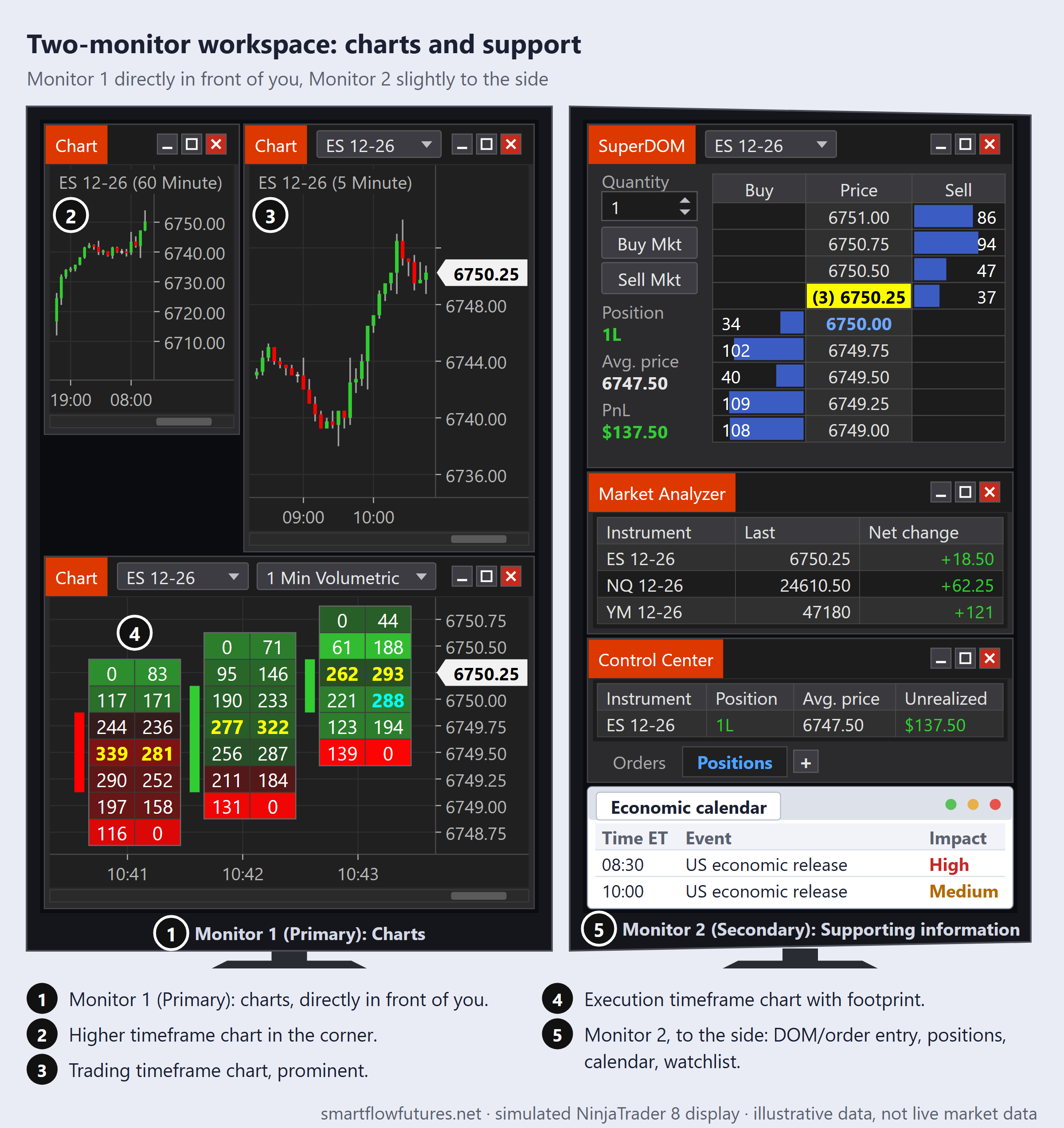
Two Monitors: The sweet spot for most traders. One for charts, one for order management and supporting information. Significant improvement over single monitor without overwhelming.
Three Monitors: Useful if you trade multiple instruments or need extensive Order Flow tools. Requires good organization to avoid overwhelm.
Four or More: Rarely necessary. Often leads to information overload. More screens does not equal better trading.
Start with what you have. Add monitors only when you have a specific need that cannot be met otherwise.
Two-Monitor Configuration
The most common and effective setup:
Monitor 1 (Primary): Charts
Your main analysis and execution charts. Higher timeframe chart in corner. Trading timeframe chart prominent. Execution timeframe chart with footprint. This is where your eyes spend most of their time.
Monitor 2 (Secondary): Supporting Information
DOM/order entry. Position manager. Economic calendar. Watchlist or correlated markets. Browser for reference if needed.
Position Monitor 1 directly in front of you. Monitor 2 slightly to the side (dominant hand side usually works best).
Three-Monitor Configuration
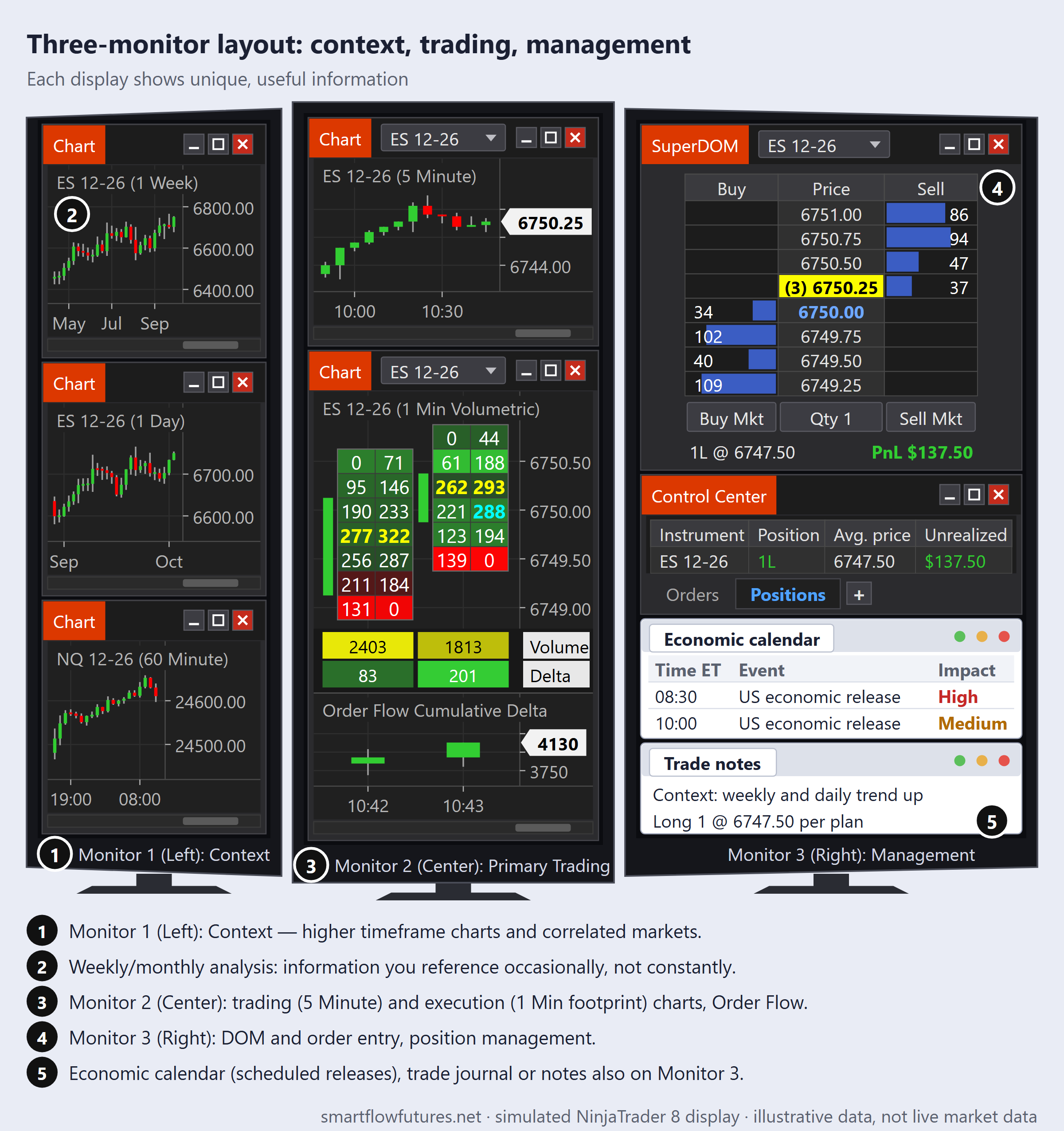
If you need a third monitor (numbered left to right here, so your primary screen becomes Monitor 2, in the center):
Monitor 1 (Left): Context
Higher timeframe charts. Correlated markets. Weekly/monthly analysis. Information you reference occasionally, not constantly.
Monitor 2 (Center): Primary Trading
Trading timeframe and execution timeframe charts. Footprint and Order Flow. Where your attention focuses during active trading.
Monitor 3 (Right): Management
DOM and order entry. Position management. Economic calendar (scheduled news releases). Trade journal or notes.
Physical Setup Considerations
Monitor Height: Top of screen at or slightly below eye level. Prevents neck strain during long sessions.
Distance: Arms length away approximately. Close enough to read comfortably. Far enough to see full screen without head movement.
Angle: Slight upward tilt can reduce glare. Side monitors angled toward you for comfortable viewing.
Lighting: Avoid glare from windows behind you. Reduce overhead lighting if possible. Consider bias lighting behind monitors.
Common Multi-Monitor Mistakes
Information Overload: Filling every inch with data. More information is not always better. If you cannot process it, it is noise.
Distraction Screens: Email, social media, or general news feeds on a trading screen. These do not help your trading. Keep distractions off trading screens entirely. Scheduled economic releases are different: keep an economic calendar on your supporting or management screen.
Duplicate Information: Same chart on multiple screens. Wastes valuable screen space. Each display should show unique, useful information.
Poor Ergonomics: Screens too high, too low, or at bad angles. Causes physical strain over time. Invest time in proper positioning.
Single Monitor Strategies
If you only have one monitor, maximize it:
Tabbed Workspaces: Most platforms support multiple tabs or workspaces. Quick switch between analysis view and execution view.
Keyboard Shortcuts: Learn shortcuts for switching views. Faster than clicking through menus.
Prioritize Ruthlessly: Only display what you need for the current task. Change layouts as you move through your process.
Use Your Phone/Tablet: Economic calendar or watchlist on mobile device. Frees monitor space for charts.
Hardware Considerations
Monitor Size: 24-27 inch monitors are common for trading. Larger is not always better—viewing distance matters.
Resolution: 1080p minimum, 1440p or 4K better. Higher resolution means sharper text and more information per screen.
Graphics Card: Must support the number of monitors you want to run. Modern cards easily handle 2-3 monitors.
Mounts: Monitor arms or stands for adjustability. Allow you to position monitors optimally. Keep desk surface clean.
Key Takeaways
Two monitors is the sweet spot for most traders. Primary monitor for charts; secondary for supporting information. More monitors does not equal better trading. Physical setup matters—consider height, distance, and angles. Avoid information overload and distractions. Single monitor is fine with good organization and keyboard shortcuts.