Your trading platform is the cockpit from which you execute every trade. Choosing the right one can enhance your trading; choosing poorly can handicap you from day one. This guide helps you evaluate what matters and make an informed decision.
Why Platform Choice Matters
The platform you use affects multiple aspects of your trading:
Execution Speed: How quickly your orders reach the exchange. In fast markets, milliseconds matter.
Analysis Capability: What charts, indicators, and tools are available. Can you see what you need to see?
Order Management: How easily can you place, modify, and manage orders? Complex order types available?
Reliability: Does it crash during volatile moments when you need it most?
Cost: Platform fees, data fees, and associated costs add up over time.
Essential Platform Features
Every serious futures trading platform should offer:
Real-Time Data: Accurate, fast price feeds. Delayed data is useless for active trading.
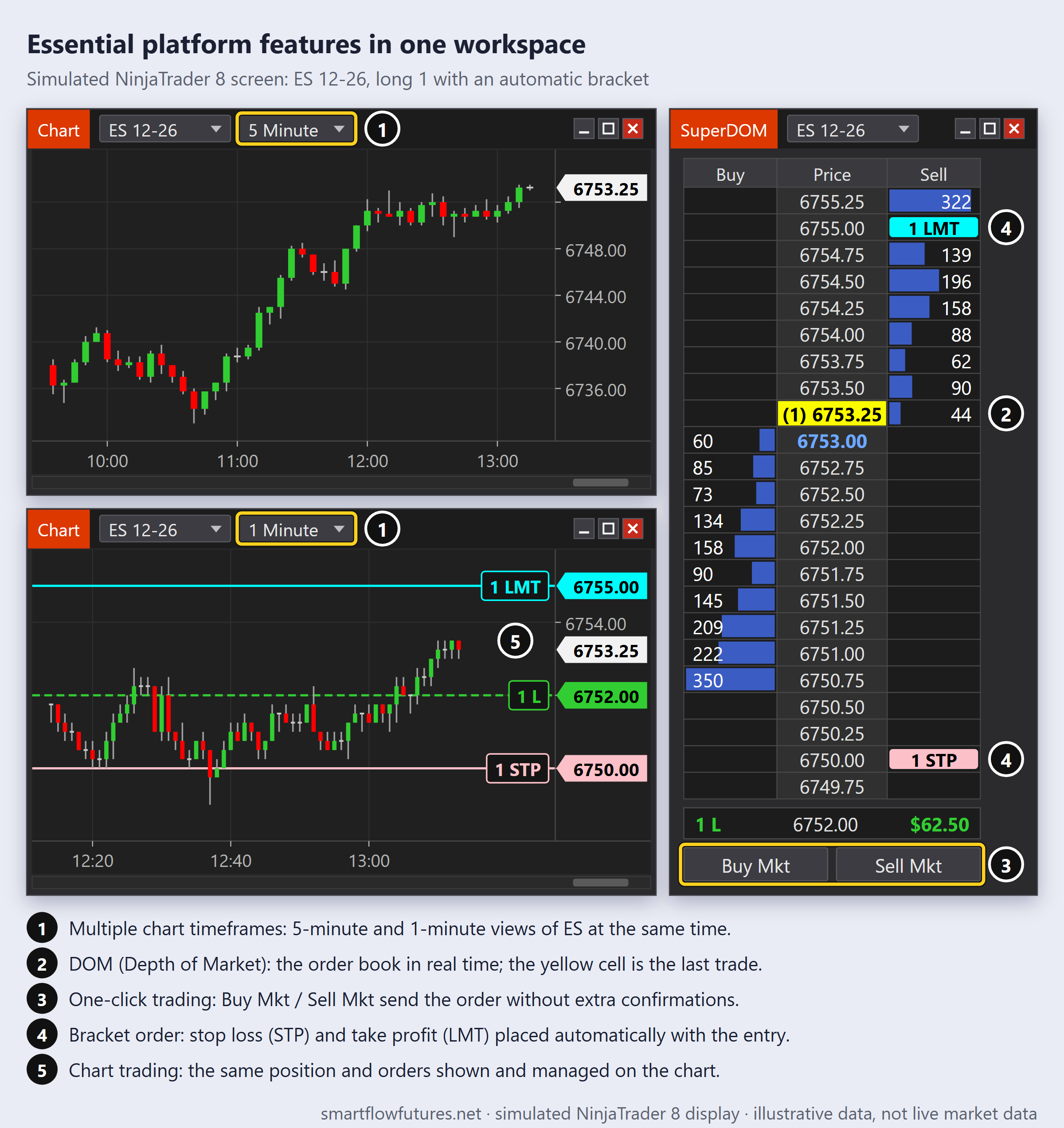
Multiple Chart Timeframes: Ability to view multiple timeframes simultaneously.
DOM (Depth of Market): Essential for futures trading. Shows the order book in real-time.
One-Click Trading: Quick order entry without multiple confirmations.
Bracket Orders: Automatic stop loss and take profit placement with entries.
Chart Trading: Ability to place and manage orders directly from charts.
Order Flow Specific Requirements
For Order Flow trading, you need additional capabilities:
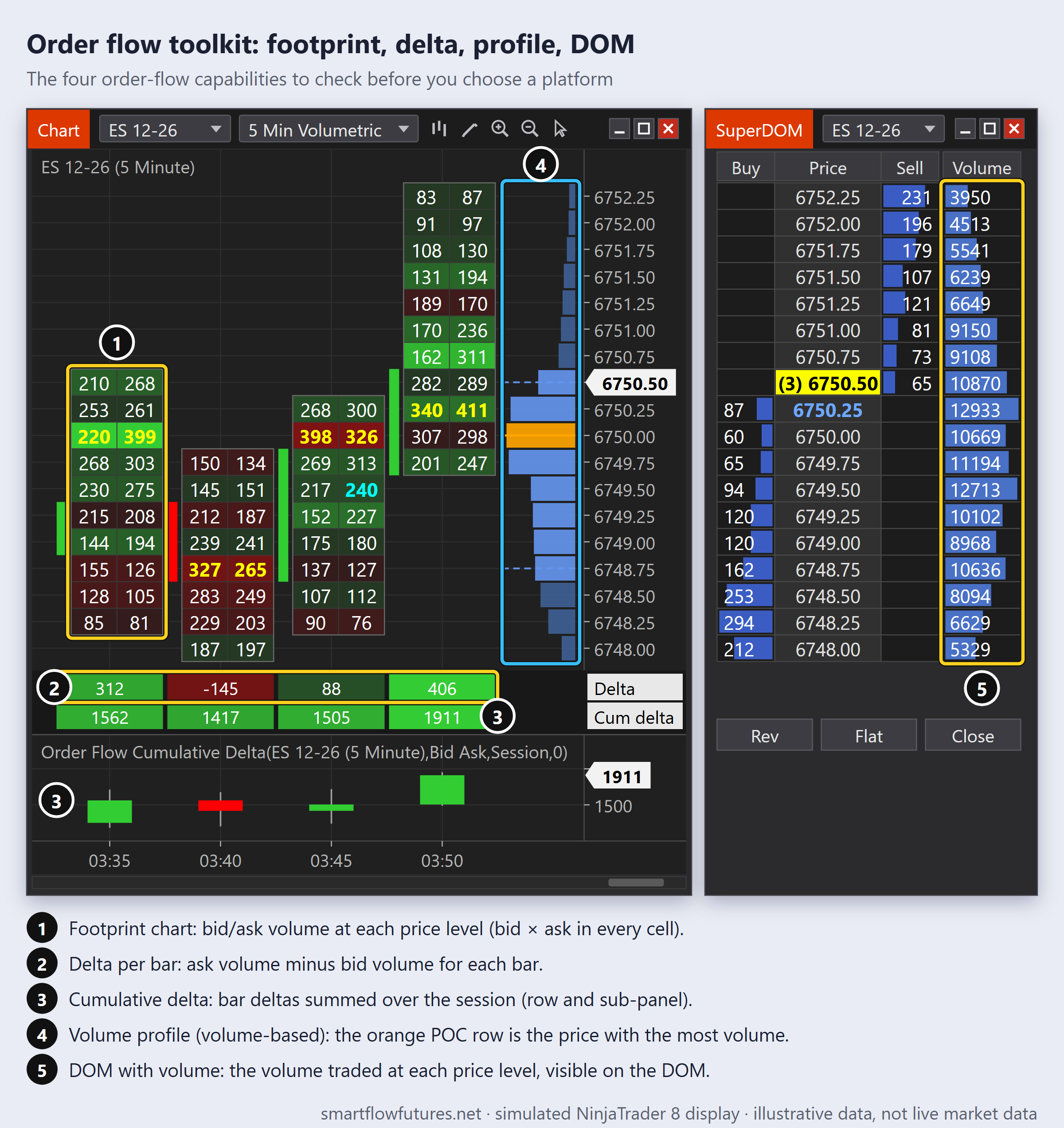
Footprint Charts: Volume at price visualization. Shows bid/ask volume at each level.
Delta Indicators: Cumulative delta and delta per bar; divergence is read by comparing cumulative delta with price (dedicated divergence tools are often add-ons).
Volume Profile: Volume traded at each price level, shown as a horizontal histogram. A TPO Market Profile is a different tool: it counts time spent at each price, not volume.
DOM with Volume: Volume traded at each price level visible on the DOM.
Not all platforms offer these features natively. Some require add-ons or third-party tools.
Popular Platform Overview
NinjaTrader:
Strengths: Free to use for charting and simulation. Extensive third-party add-on ecosystem. Good Order Flow tools available. Direct broker connectivity.
Weaknesses: Can be resource-intensive. Learning curve for advanced features. Some advanced features, including the Order Flow+ tools (Volumetric bars, Volume Profile, Cumulative Delta), require license purchase.
Best for: Traders who want flexibility and access to Order Flow tools without high upfront costs.
Sierra Chart:
Strengths: Extremely fast and lightweight. Excellent native Order Flow tools. Low cost. Highly customizable.
Weaknesses: Steep learning curve. Interface is less polished. Documentation can be technical.
Best for: Serious Order Flow traders who prioritize speed and depth of analysis.
TradingView:
Strengths: Beautiful interface. Excellent charting. Social features and idea sharing. Cloud-based, works anywhere.
Weaknesses: Limited Order Flow tools. Execution requires third-party broker integration. Not ideal for scalping.
Best for: Swing traders and those prioritizing charting and analysis over execution.
Bookmap:
Strengths: Excellent Order Flow visualization. Heatmap view of liquidity. Intuitive visual approach.
Weaknesses: Higher cost. Specialized tool, may need separate charting platform. Resource-intensive.
Best for: Traders focused specifically on Order Flow and tape reading.
Cost Considerations
Platform costs include multiple components:
Platform License: Monthly or one-time fee for the software itself. Some platforms are free (NinjaTrader basic), others have monthly fees.
Data Feeds: Real-time futures data costs money. CME data typically $10-25 per month per exchange. This is separate from platform costs.
Add-Ons: Many advanced features require third-party add-ons with additional costs.
Broker Commissions: While not a platform cost, your broker choice is often linked to platform choice.
Budget $50-150 per month for platform and data costs when starting. This can increase with additional tools.
Evaluation Process
Step 1: List Your Requirements
What features are essential versus nice-to-have? What is your budget? Do you need Order Flow tools?
Step 2: Trial Periods
Most platforms offer free trials or simulation modes. Test thoroughly before committing.
Step 3: Test in Simulation
Trade in simulation for at least two weeks. Test during volatile sessions. Verify all features work as expected.
Step 4: Community Research
Join forums and communities. Ask current users about reliability and support. Check for known issues.
Platform Switching
Switching platforms later is possible but disruptive:
Learning curve for new interface. Rebuilding your workspace and settings. Potential for missed trades during transition.
Choose carefully initially to minimize switching. However, do not hesitate to switch if your current platform is genuinely limiting you.
Key Takeaways
Essential features include real-time data, DOM, one-click trading, and bracket orders. Order Flow trading requires footprint charts, delta tools, and volume profile. Popular options include NinjaTrader, Sierra Chart, TradingView, and Bookmap. Budget $50-150 per month for platform and data costs. Use trial periods extensively before committing. Choose carefully—switching platforms is disruptive.